0.14 Patch Notes
January 16th 2026
Intro
A new version of GD-Sync is now available for download. Version 0.14 introduces new features and bug fixes.
Bug Fixes
Some bugs have been resolved:
- SynchronizedRigidBody3D & RigidBody2D Function Renames:
A bug has been fixed where GD-Sync previously overrode built-in Godot physics functions (such as apply_force() and related calls). This is not officially supported by Godot and it has become unreliable in more recent editor versions and could cause the synced physics logic to behave incorrectly.
To make this fully robust, all physics functions that include extra networking logic have been renamed to use the _synced postfix. This prevents conflicts with the engine and makes it explicit when you are calling the network-aware version.
Renamed functions (RigidBody2D & RigidBody3D):
- apply_central_impulse -> apply_central_impulse_synced
- apply_central_force -> apply_central_force_synced
- apply_impulse -> apply_impulse_synced
- apply_force -> apply_force_synced
- apply_torque -> apply_torque_synced
- apply_torque_impulse -> apply_torque_impulse_synced
SynchronizedAnimationPlayer Function Renames:
Just like the SynchronizedRigidBody nodes, the SynchronizedAnimationPlayer no longer overrides built-in AnimationPlayer functions for its syncing logic. All functions that include extra multiplayer behavior now use the _synced postfix to avoid engine conflicts and ensure consistent behavior across Godot versions.
Renamed functions:
- play -> play_synced
- play_backwards -> play_backwards_synced
- pause -> pause_synced
- stop -> stop_synced
- queue -> queue_synced
- seek -> seek_synced
- advance -> advance_synced
SynchronizedAnimationTree Oneshot Fix:
OneShot animations in the SynchronizedAnimationTree were not being synchronized correctly and would never trigger on other clients. This issue has been fixed and OneShot animations now properly fire and replicate across all connected clients.
SynchronizedAnimationTree Instantiate Error:
The SynchronizedAnimationTree could throw an error when instantiated using the NodeInstantiator or multiplayer_instantiate(). This happened because the node tried to access its NodePath before it was fully inside the scene tree. This has now been fixed and the node can be safely instantiated through both methods.
Improvements & Additions
This new version comes with some new features and changes:
- GD-Sync Network Profiler:
A major new feature has been added to the plugin. The new GD-Sync Network Profiler lets you inspect network transfer usage in precise detail, showing sent and received data per client, latency between clients, and every message that has been sent. This makes it easy to track bandwidth spikes, find inefficient sync logic, and optimize multiplayer performance.
The General tab shows overall transfer statistics, including total bytes and messages sent and received, bytes and messages per second, and average message size. It also includes a live graph that displays transfer usage per second.
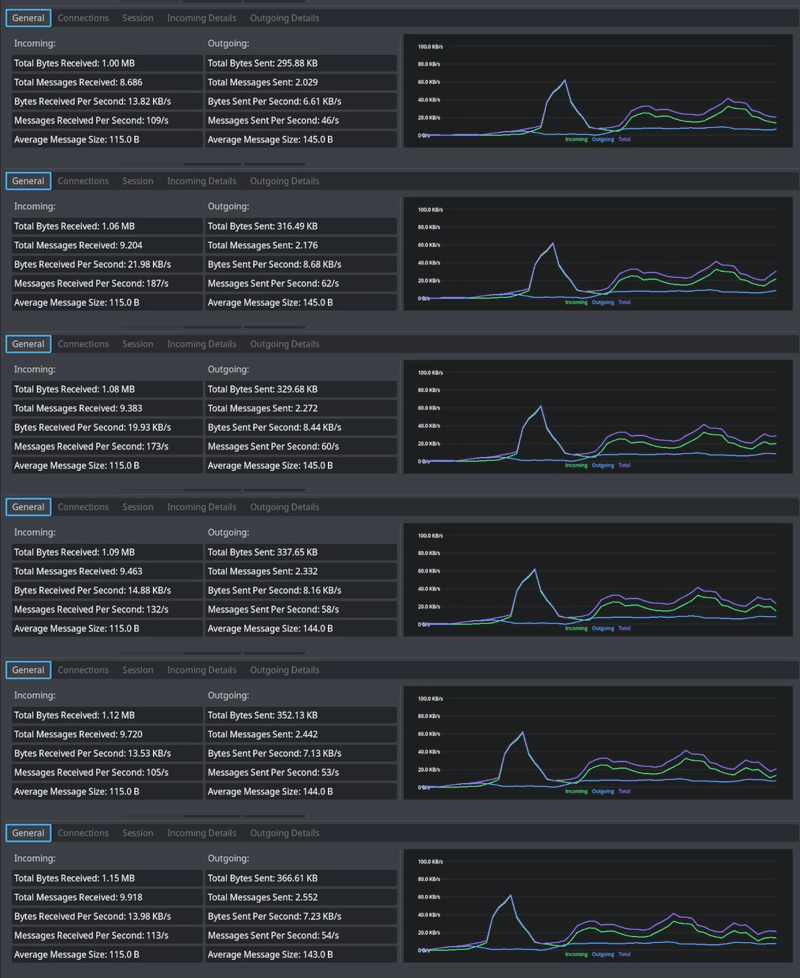
The Connections tab shows latency between clients and measures jitter, making it easy to see how stable each connection is over time. You can compare peers side by side, track average and current latency, and quickly identify clients with unstable or inconsistent connections that may affect gameplay quality.

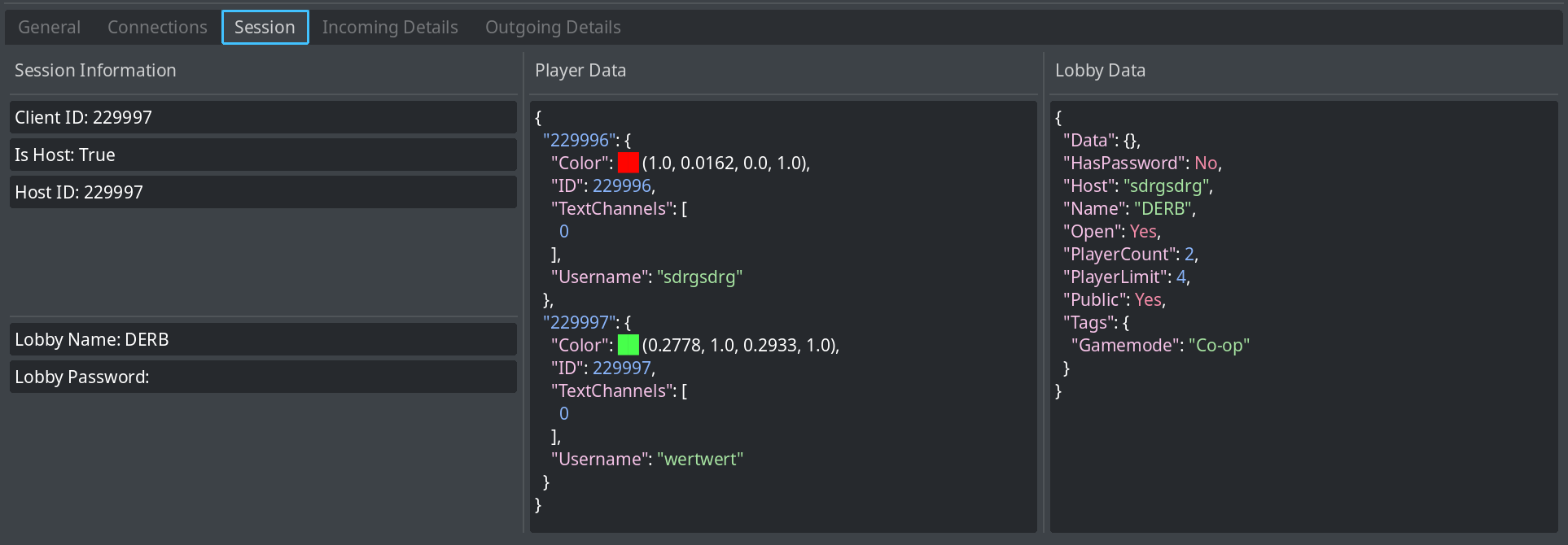
The Session tab shows all information of the current session, such as your client ID, which player is the host, and all stored player and lobby data.
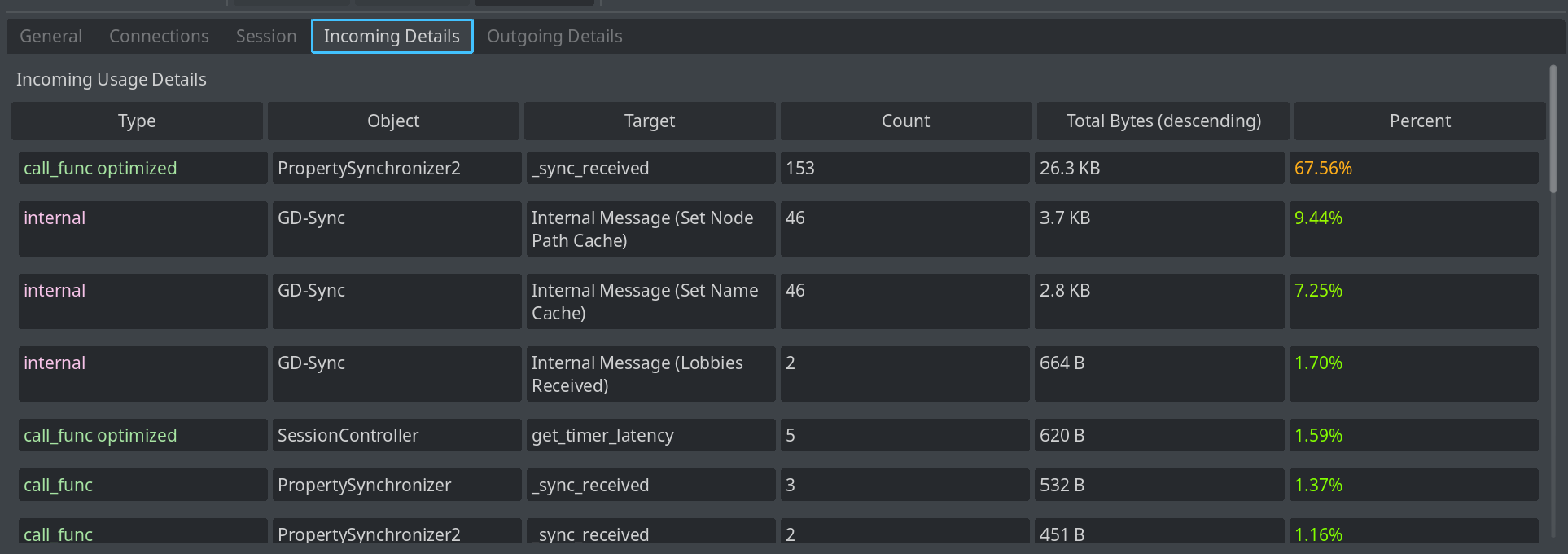
The Incoming and Outgoing Details tabs register every message that is sent. Each entry shows the message type (call_func, sync_var, etc), the Node that sent or received it, the target function or variable, how many times it was sent, how many bytes it used in total, and the percentage of total transfer it represents. This makes it easy to pinpoint exactly which nodes or features are using the most bandwidth.
Together, these tools give you full insight into how your game uses GD-Sync. Whether you are debugging sync issues or optimizing bandwidth, the GD-Sync Network Profiler gives you the data you need to make informed decisions and ship smoother online experiences.
GD-Sync Script Linter:
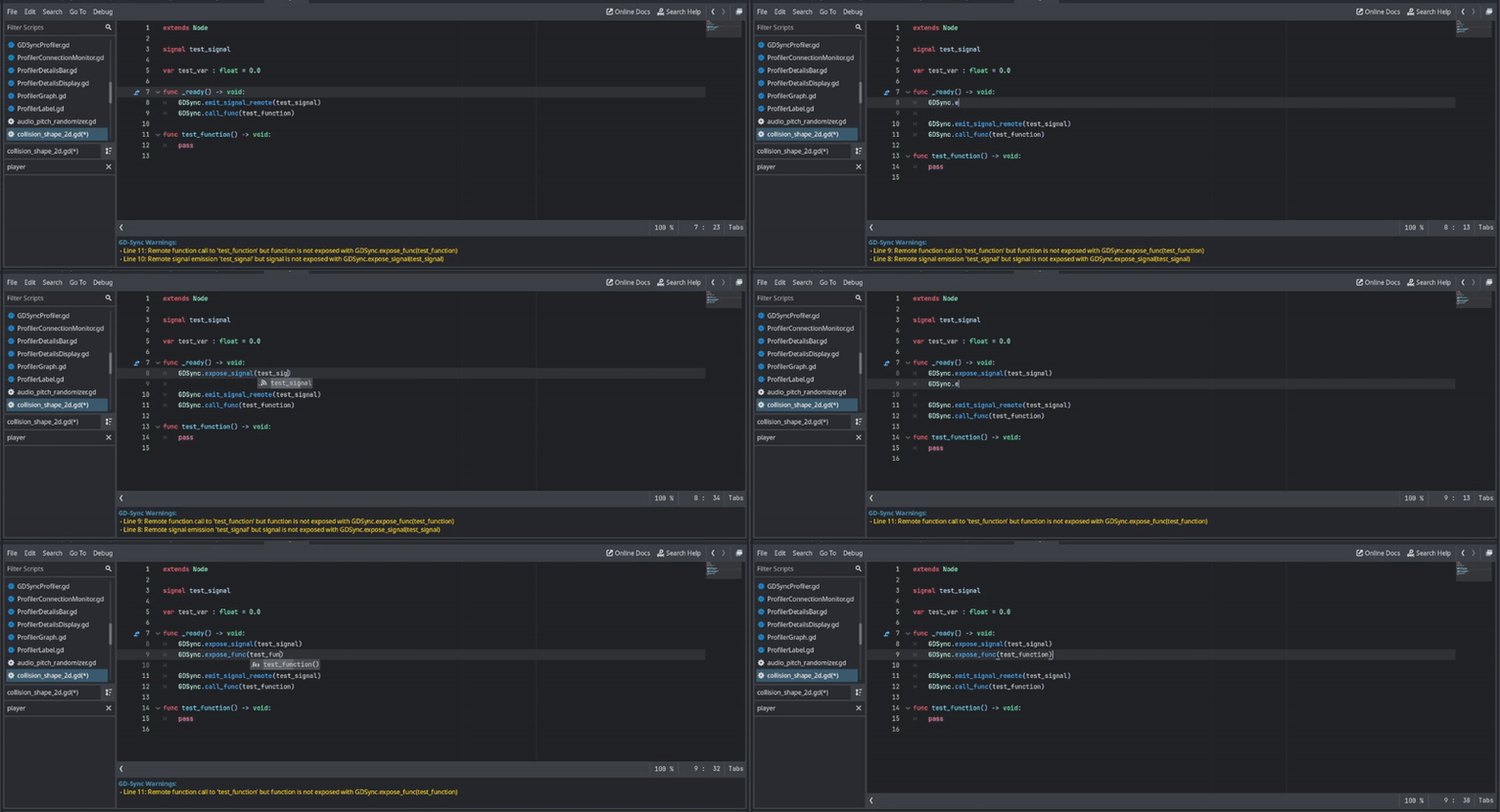
A new custom script linter has been added that checks the script you are currently editing for GD-Sync related errors. It detects things like unexposed functions being called remotely, as well as invalid variables and signals. This helps you catch mistakes early, before you even run your game.
When issues are found, warnings are shown directly underneath the code editor so you can spot and fix them immediately.
SynchronizedAudioStreamPlayer:
A new type, SynchronizedAudioStreamPlayer, has been added. It lets you easily play sounds on all clients. Simply call play_synced() instead of play() and the sound will play on every client. When playing, it automatically syncs volume and pitch. You can stop the sound using stop_synced() instead of stop().
SynchronizedAudioStreamPlayer2D:
A new type, SynchronizedAudioStreamPlayer2D, has been added. It works the same as SynchronizedAudioStreamPlayer, but for 2D. When playing, it automatically syncs volume, pitch, attenuation, and distance settings.
SynchronizedAudioStreamPlayer3D:
A new type, SynchronizedAudioStreamPlayer3D, has been added. It works the same as SynchronizedAudioStreamPlayer, but for 3D. When playing, it automatically syncs volume, pitch, attenuation, and distance settings.

SynchronizedAnimatedSprite2D:
A new type, SynchronizedAnimatedSprite2D, has been added. It automatically synchronizes all your 2D animations, including animation state, flipping, and playback speed, across all clients.
This means you no longer need to manually sync animation properties or rely on PropertySynchronizers or custom code. Simply use SynchronizedAnimatedSprite2D like a normal AnimatedSprite2D, and all visual animation changes will stay perfectly in sync in multiplayer.
Make sure to use animation-related functions with the _synced postfix, such as play_synced(), stop_synced(), and similar methods, so changes are properly synchronized.

Remote Signal Emission:
The plugin now supports emitting signals across the network using the new emit_signal_remote(), emit_signal_remote_on(), and emit_signal_remote_all() functions. This makes remote signal emission much easier than before and removes the need for complex workarounds or custom networking code to trigger events on other clients.
Please check out the documentation for detailed usage.
SynchronizedRigidBody2D & SynchronizedRigidBody3D Optimizations :
SynchronizedRigidBody2D and SynchronizedRigidBody3D have been analyzed using the new Network Profiler and have been optimized. These improvements make both types up to 5x more efficient in terms of transfer usage than before. This is a direct result of using the Network Profiler to see exactly where bandwidth was being wasted and fixing only those parts, proving how powerful the profiler is for optimizing.
Get Username:
To complement player_set_username(), a new function player_get_username() has been added to easily retrieve usernames. You no longer need to use player_get_data(), making username access simpler and cleaner.
- Contributed by KoobzZ
Ping Measurement Improvements:
Ping handling has been improved. get_client_ping() now returns raw network travel time between clients. The new get_client_percieved_ping() returns perceived latency, which includes network travel time plus extra delay caused by frame timing. This makes it easier to choose between technical latency and what players actually feel in gameplay.
Toast Notifications:
Plugin-related messages are no longer printed to the console. Important notifications such as new available updates and other plugin alerts are now shown as clear popup toast messages inside the editor, making them much more visible and harder to miss.
Upgrading
Upgrading to version 0.14 can be done right from the configuration menu (Project -> Tools -> GD-Sync). It is also possible to download the plugin directly from our GitHub.
Looking Forward
Please let us know if you encounter any issues in version 0.14. For feature requests or bug reports, please visit our support page!
Thank you for using GD-Sync. Your feedback is crucial to our continuous improvement.
